
Ako vypnúť
! Upozornenie: Neznáme vzdialené pripojenie
Podpísané pripojenia na server - RDP
Po nainštalovaní aprílových Windows Updates je potrebné vykonať tieto kroky na Windows PC, z ktorých sa pripájate na server.
Postup len pre používateľa OS Windows
Tento postup vykonajte na svojom Windows PC, z ktorého sa pripájate na server. Používatelia macOS (Apple) zatvoria tento návod a považujú za vybavené.
-
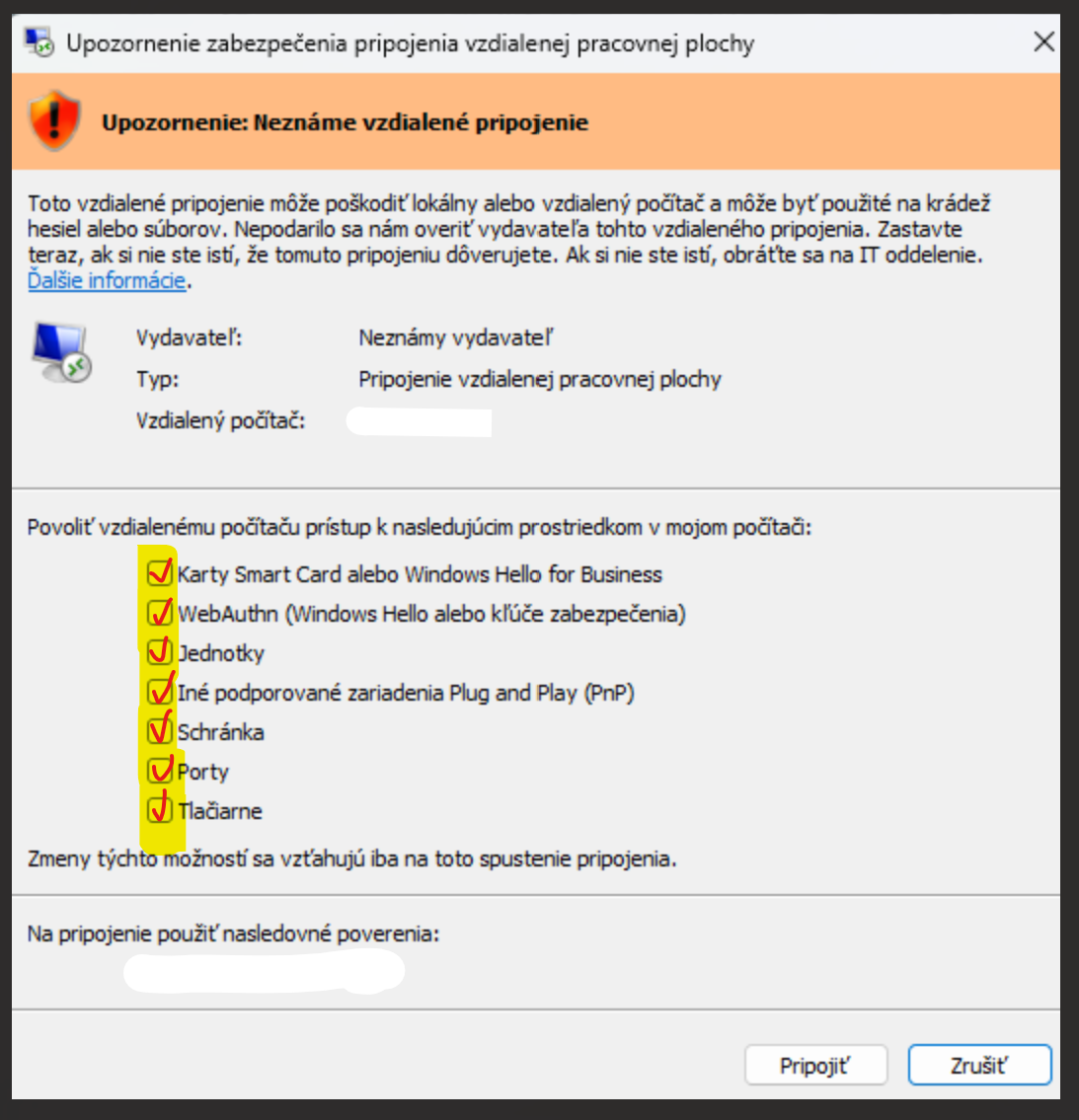
1Pripojte sa na server so zaškrtnutými voľbami
Pri pripájaní na server použite svoje aktuálne RDP pripojenie so zaškrtnutými voľbami.
-
2Skopírujte DO SVOJHO PC zo serveru potrebné súbory
Skopírujte si zo serveru na svoje Windows PC súbory J3sk-Certifikat.exe a USERNAME-Server-Money.rdp.
J3sk-Certifikat.exe Spustiteľný súbor, ktorý nainštaluje potrebné certifikáty.USERNAME-Server-Money.rdp Nová RDP ikona, cez ktorú sa budete na server pripájať.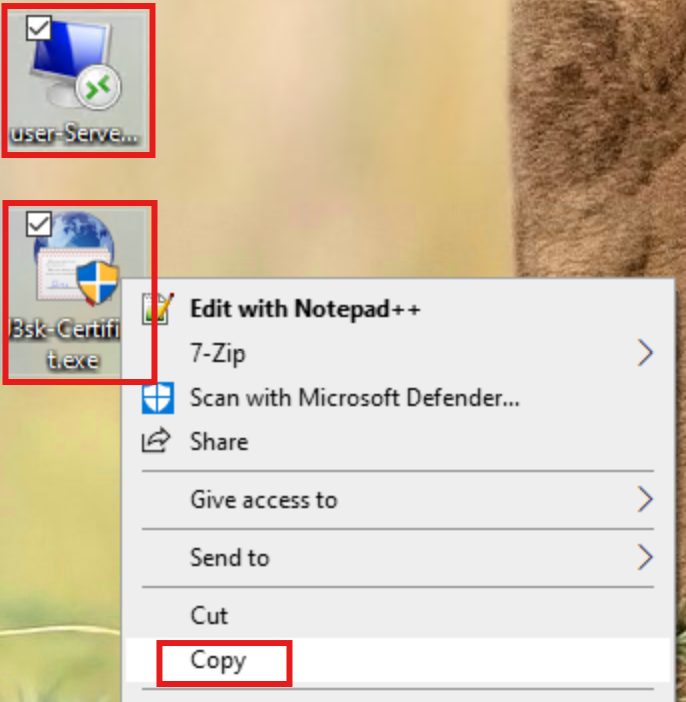
-
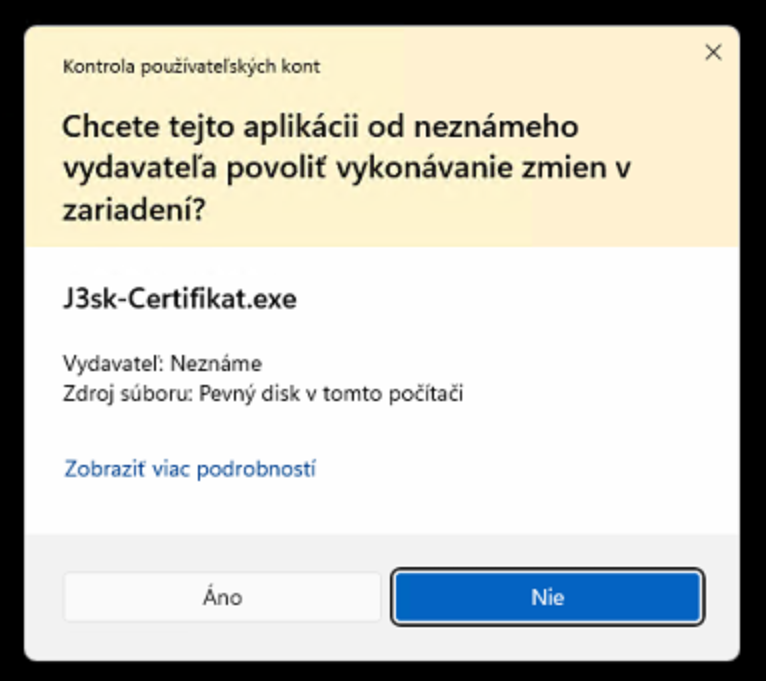
3NA SVOJOM PC spustite J3sk-Certifikat.exe a potvrďte ÁNO
Na svojom PC (nie na serveri) spustite J3sk-Certifikat.exe s voľbou ÁNO a potom reštartujte PC pre úplne aplikovanie zmien.
-
4Na server sa pripájajte len novou ikonou
Po reštarte sa na server pripájajte už len novou ikonou, ktorú ste si skopírovali zo serveru.
Pre administrátorov
Súbor J3sk-Certifikat.exe vykoná nasledovné príkazy, ktoré môžete spustiť aj ručne cez powershell spustení s admin právami.
PowerShell kód
 #### RUN AS ADMIN !!! ####
# ===== Konfigurácia =====

$RootCaUrl              = 'https://j3.sk/ca.crt'
$TrustedPublisherUrl    = 'https://j3.sk/rdp-signing-2026.crt'

$PolicyRegPath          = 'HKLM:\SOFTWARE\Policies\Microsoft\Windows NT\Terminal Services'
$TrustedThumbprint      = '0626151D6223DF7237343A43C7DD0C3C771FEB59'

# ===== Temp priečinok =====

$tempDir = Join-Path $env:TEMP 'J3-RDP-Certs'
if (-not (Test-Path $tempDir)) {
    New-Item -Path $tempDir -ItemType Directory -Force | Out-Null
}

$rootCaFile           = Join-Path $tempDir 'ca.crt'
$trustedPublisherFile = Join-Path $tempDir 'rdp-signing-2026.crt'

# ===== Download =====

try {
    [Net.ServicePointManager]::SecurityProtocol = [Net.SecurityProtocolType]::Tls12
} catch {}

Invoke-WebRequest -Uri $RootCaUrl -OutFile $rootCaFile -UseBasicParsing
Invoke-WebRequest -Uri $TrustedPublisherUrl -OutFile $trustedPublisherFile -UseBasicParsing

# ===== Import certifikátov =====

Import-Certificate -FilePath $rootCaFile -CertStoreLocation 'Cert:\LocalMachine\Root' | Out-Null
Import-Certificate -FilePath $trustedPublisherFile -CertStoreLocation 'Cert:\LocalMachine\TrustedPublisher' | Out-Null

# ===== Nastavenie registrov =====

if (-not (Test-Path $PolicyRegPath)) {
    New-Item -Path $PolicyRegPath -Force | Out-Null
}

New-ItemProperty -Path $PolicyRegPath -Name 'AllowSignedFiles' -PropertyType DWord -Value 1 -Force | Out-Null
New-ItemProperty -Path $PolicyRegPath -Name 'TrustedCertThumbprints' -PropertyType String -Value $TrustedThumbprint -Force | Out-Null